SMS opt-in form — reviewer copy
Where the opt-in happens
Only signed-in HearthVault account holders can reach the form. It is never shown to visitors, and no phone number is collected anywhere else on the site. The user types their own number; the consent box starts unchecked and the “Text me a code” button stays disabled until it is ticked.
Screenshot of the live form
Captured from the HearthVault app (Vault → Security → Mobile number). Direct image: sms-opt-in-screenshot.png.
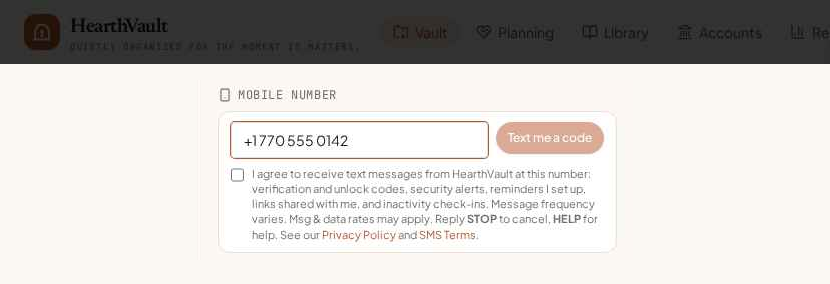
Text of the form
Mobile number
Get unlock codes, security alerts and the reminders you set up by text.
What happens next (double opt-in)
1. After ticking the box and tapping “Text me a code”, HearthVault sends one message: “449221 is your HearthVault verification code. It expires in 30 minutes. Reply HELP for help.”
2. The user types that 6-digit code back into the app (or texts it to +1 (678) 398-4808). Only then is the number marked verified and eligible for the account texts described in the consent language.
3. The date, time and consent text are stored with the number. The user can remove the number in the same screen at any time, or reply STOP.
Keyword opt-in
A user whose number is already on their account may text START to +1 (678) 398-4808 to re-subscribe after a STOP. Reply: “HearthVault: you are now opted in to verification codes and the document reminders you choose. Msg&data rates may apply. Reply HELP for help, STOP to opt out.”
Disclosures shown at opt-in
- Brand name (HearthVault) and the types of messages sent
- “Message frequency varies” and “Msg & data rates may apply”
- STOP to cancel, HELP for help
- Links to the SMS Privacy Policy and SMS Terms & Conditions
- Consent is not a condition of purchase; HearthVault works fully without a phone number